Granting access to your Meta Business Suite to a third-party agency does not transfer ownership. This step simply allows the agency to help you manage your Pages or ads.
Access Level: Multiple
When to Use This: When an agency or contractor needs access to your Meta Business Suite account to start working with you.
What You Need: Your agency or contractor must provide you with their Meta Business ID.
Steps:
-
Log In
Go to your Meta Business Suite account. If you have multiple accounts, select the relevant one.
-
Navigate to Partner Settings
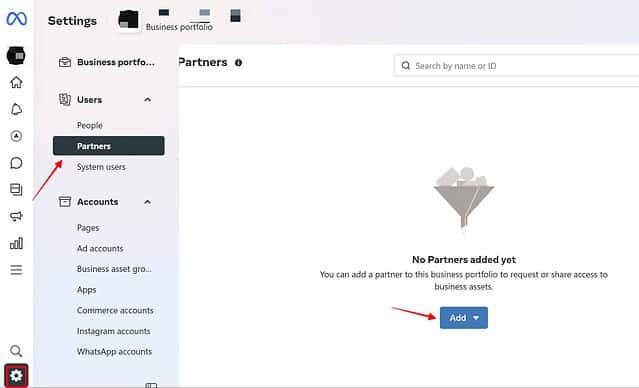
Click on the gear icon (Settings). Under “Users,” select “Partners” and then click “Add.”
-
Give Access
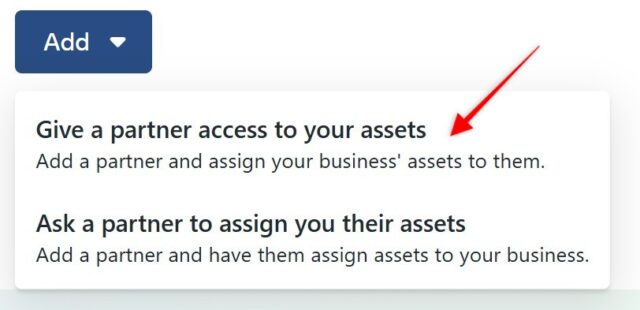
Choose “Give a partner access to your assets.”
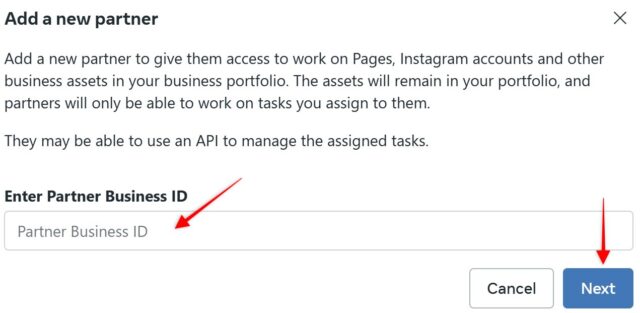
Enter your partner’s business ID (provided by them) and click “Next.”
-
Assign Ad Account Access
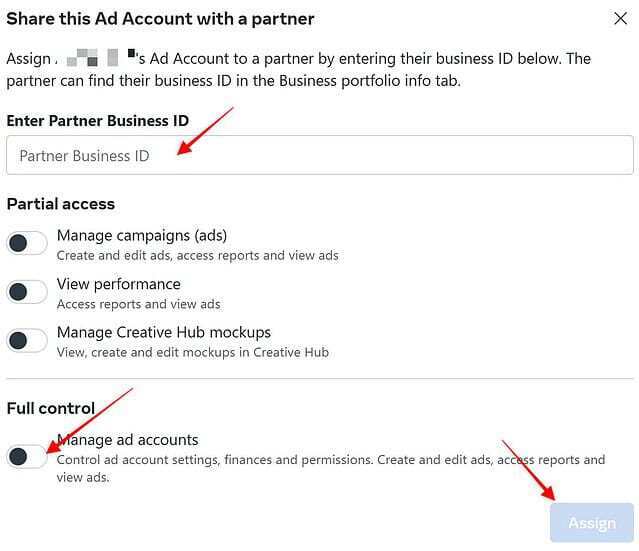
In “Settings,” go to “Ad accounts” under “Accounts.”
Click “Assign partner,” enter the partner’s business ID again, and toggle “Full control” for the ad account.
Click “Assign” to confirm.
That’s it! You have successfully granted your partner’s agency access to your Meta Business Suite assets. They can now assign the same permissions you have set to their team members.